
Next-Gen Mobile AI Inspection & Guided Field Capture
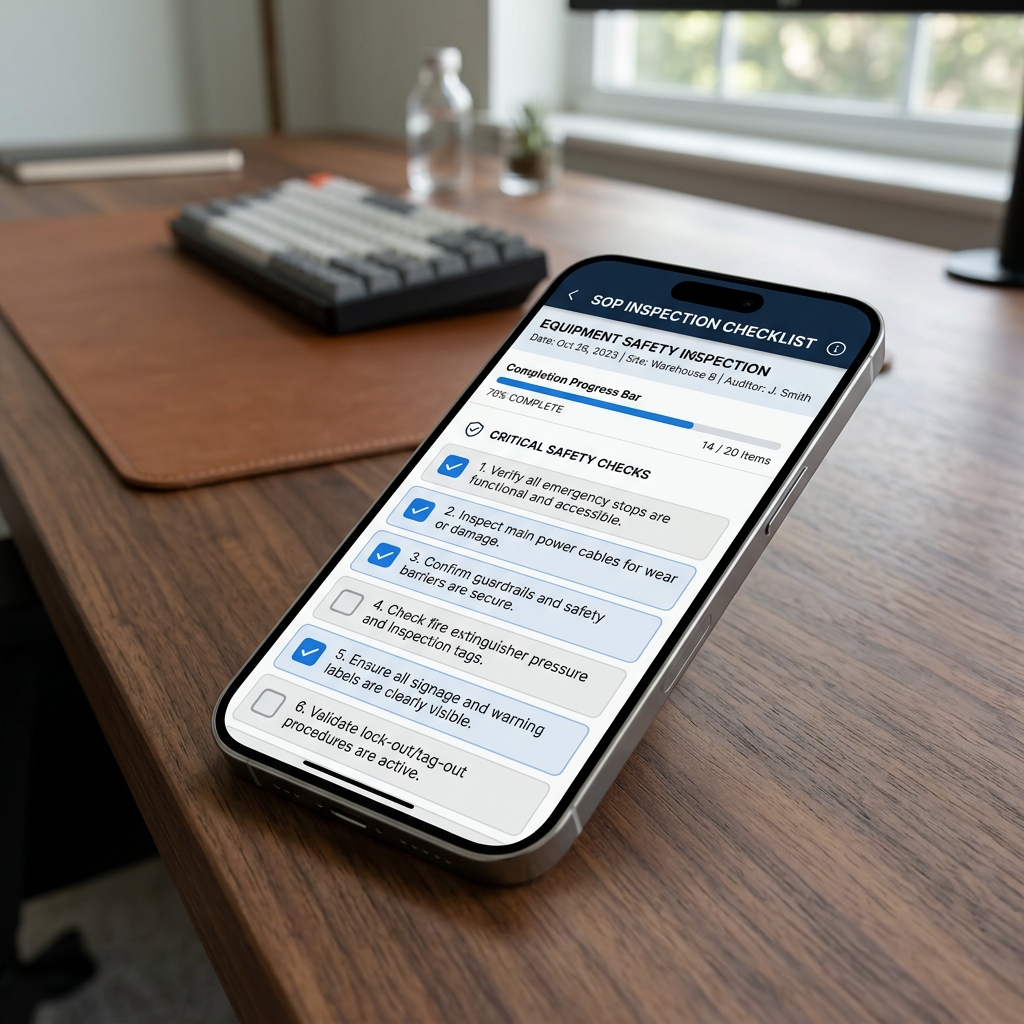
A simple mobile app for your phone or tablet that makes inspections easier. Your team can check equipment, machines, products, or sites, while AI helps them capture correct readings, follow the right steps, find issues, and create clear reports instantly.
Mobile Field App & Guided Capture
Eliminate checklist evaluation differences and log readings instantly with on-device OCR.
Guided Inspection App
Display visual reference images for checkmarks to ensure consistency.
Improvement: Prevents operator bias.
Analog Dial OCR Scanner
Extract dial readings from pressure gauges or thermometers instantly.
Improvement: Speeds up logging.
Geo & Time Stamp Logs
Capture GPS coordinates, timestamp, and user ID to verify presence.
Improvement: Ensures compliance audit trail.
Offline Sync
Store checks locally and upload when network connectivity returns.
Improvement: Enables remote field use.
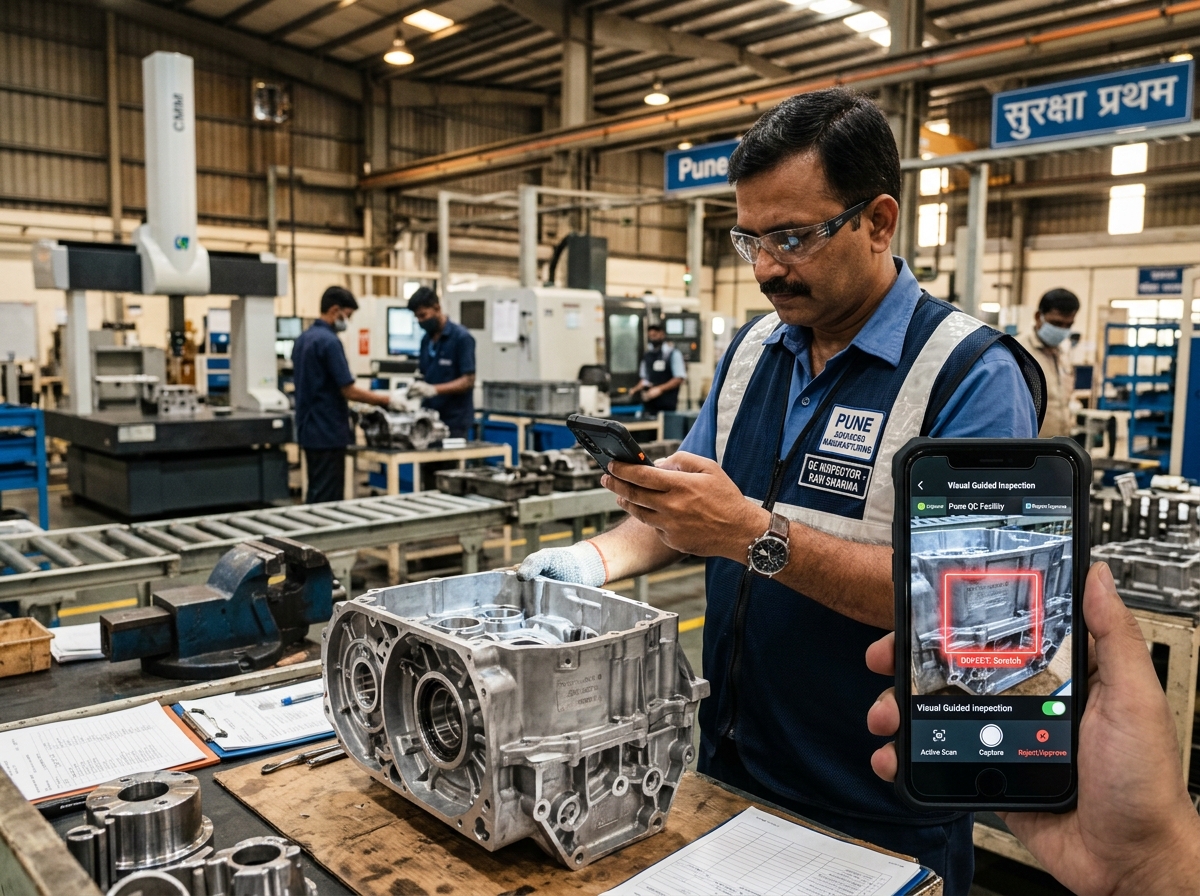
Guidance to Eliminate Inspector Bias
Manual inspection can vary wildly between inspectors. Our mobile app guides technicians with pre-approved reference images, showing exactly what a good state looks like before submission.
1. Asset Master Setup
Register assets with site locations, models, and tag them with unique QR codes or NFC tags.
2. QR/NFC Tag Scanning
Inspectors scan the tags on-site to verify physical presence, auto-loading the correct checklists.
3. Guided Media Capture
The app shows reference overlays side-by-side. Photos are taken from identical angles every run.
Inspections Connected to Every Module
Pure Technology's platform integrates seamlessly with all maintenance modules for complete operational visibility.
Work Orders
Auto-generate from failures
Assets
Link to equipment history
Preventive Maintenance
Schedule from findings
Reports & Analytics
Inspection metrics dashboards
Team
Inspector assignment flows
EHS Management
Safety & compliance audits
Incidents
Report & track site failures
Documents
Attach manuals & templates
Replace Paper Checklists with Digital Inspections
Create digital checklists for different types of inspections and complete them directly from your phone or tablet.
Logical Sections
Organize checks into groups like Safety, Visual, or Mechanical.
Different Answer Types
Record pass/fail answers, enter numbers, write notes, or choose options.
Critical Alerts
Flag important checks that trigger immediate alerts when they fail.
Photo Proof
Require photos for specific checks so you have visual evidence.
Sign-off
Capture digital signatures directly on the screen for accountability.
Overall Scores
Calculate a pass or fail score automatically based on the results.
CHK-101: Generator Maintenance & Safety Check
Complete 7-Step Inspection Workflow
Here is how a paper check turns into a quick, guided digital inspection from start to finish.
Select what to inspect
Choose the item or site from a list in the app, or simply scan its barcode or QR tag to open the correct checklist.
Start New Inspection
Initiate inspections in seconds with our streamlined workflow. Select your asset, choose a checklist, configure environmental conditions, and start inspecting—all from your mobile device or desktop.
Asset Selection
Search and select from your asset database with QR code scanning.
Checklist Templates
Choose from saved templates or create a new checklist on the fly.
Location Tracking
Auto-capture GPS location or select from predefined locations.
Environmental Data
Record temperature, humidity, weather conditions during inspection.
Start New Inspection
Select Asset
Generator #GEN-001
Choose Checklist
Generator Maintenance Checklist
Set Location
Main Site - Block B
Inspection Schedule
This WeekPre-Trip Inspection
Truck #T-042 • John Smith
Safety Audit
Warehouse A • Sarah Johnson
Automated Reminders
Set it and forget it. Our smart reminder system ensures your team never misses a scheduled inspection. Configure daily, weekly, monthly, or custom recurrence patterns with automatic notifications.
Flexible Scheduling
Daily, weekly, monthly, quarterly, or custom recurrence patterns.
Multi-Channel Alerts
Push notifications, email alerts, and in-app reminders.
Escalation Rules
Notify supervisors if inspections are overdue or missed.
Calendar Integration
Sync with Google Calendar, Outlook, and other calendars.
Incident Reporting & Tracking
Document safety incidents comprehensively with severity ratings, cost tracking, root cause analysis, and corrective actions. Ensure OSHA compliance and create a safer workplace.
Severity Ratings
Classify incidents as Low, Medium, High, or Critical severity.
Cost Tracking
Record estimated and actual costs associated with incidents.
Downtime Recording
Track equipment downtime caused by safety incidents.
Corrective Actions
Create and track corrective action plans with due dates.
Incident Report
INC-2024-089Hydraulic Line Failure
Dec 23, 2025 • 2:45 PM$5,000
Estimated Cost4 hrs
DowntimeDetails
Hydraulic hose burst on Excavator #EX-042 during operation. Immediate shutdown performed. No injuries reported.
Root Cause Analysis
RCA-2024-0155 Whys Trace
Root Cause Analysis (RCA)
Go beyond symptoms to find the real cause of failures. Link inspections, work orders, and incidents together to identify patterns and implement effective corrective actions that prevent recurrence.
Link Related Items
Connect inspections, work orders, and incidents for full picture.
5 Whys Analysis
Built-in methodology to drill down to root causes.
Corrective Actions
Create action plans with assignees and due dates.
Trend Analysis
Identify recurring issues and failure patterns.
Support for All Inspection Needs
Whether you are checking heavy machines, site safety, or facility conditions, the platform adapts to any type of inspection.
Machines & Equipment
Check pumps, motors, generators, and production lines to prevent unexpected breakdowns.
Facilities & Sites
Inspect building safety, fire exits, lighting, and general site conditions regularly.
Vehicles & Fleets
Run pre-trip checks for trucks, forklifts, or company cars to ensure they are safe to operate.
Safety & Compliance Checks
Perform safety walks, check PPE usage, and log environmental compliance records easily.
Connect Inspection Results With the Rest of Your Business
Inspection results can be connected with the systems and teams already involved in your business, helping you move from finding a problem to taking action.
Repair & Maintenance Jobs
Create repair requests automatically whenever an inspection check fails.
Equipment & Asset History
Keep a complete history of inspections and repairs tied to each machine or site.
Scheduling & Calendar
Plan inspections based on shift timings, calendar dates, or machine run hours.
Reports & Analytics
View dashboards of inspection results, common failures, and repair times.
Numbers from real engagements.
Inspectors complete checklists, capture photos, and submit reports in half the time by replacing paper forms with a simple mobile app.
Mandatory checklist steps and AI validation ensure every required check is completed and documented correctly.
Failed items automatically send alerts to maintenance teams, allowing you to address problems immediately rather than waiting for weekly reports.
Built for teams that need reliable inspections.
Whether you're checking a machine, product, vehicle, facility, or site, the app helps you complete the inspection correctly and record everything in one place.
- Inspectors and field workers who need a simple app to do regular checks, take photos, and record readings without carrying paper forms.
- Operations managers who want to make sure nothing is missed during inspections and that every check follows the exact same steps.
- Maintenance and quality teams who need to identify problems early and share results with the right people instantly.
- Business owners who want accurate, time-stamped inspection records for safety, audits, and compliance without the admin work.
Everything You Need for a Better Inspection
Our mobile app gives you all the tools to make field and equipment inspections simple, fast, and highly accurate.
Guided Inspections
Follow step-by-step instructions on your phone or tablet so important checks are never missed.
Easy Data Capture
Capture photos, meter readings, notes, and other information directly on your mobile device.
AI Assistance
Get smart support while inspecting. AI helps you read gauges, find visible problems, and suggest next steps.
Consistent Checks
Enforce the same inspection process across different people, locations, and equipment.
Offline Ready
Perform inspections in remote locations without a cellular connection. The app syncs automatically when you're back online.
From the Inspection Site to the Decision Makers
Inspection information doesn't stay on paper or inside one person's phone. Results are shared instantly with supervisors and decision-makers so problems can be reviewed and acted on.
Guided Field Checklists
Inspectors follow simple, step-by-step instructions on their mobile screens with photos showing exactly what to look for.
Immediate Action on Issues
If something fails an inspection, the app can automatically notify the right person to look at it and fix it.
Instant Sharing
Photos, readings, and notes go straight from the mobile device to a central dashboard, so supervisors see results without delay.
Offline Syncing
Inspectors can do their checks in remote areas without cell signal. The app saves everything and uploads it when connection is restored.
Standardized Templates
Ensure everyone across different sites, locations, and teams uses the exact same inspection checklists.
Simple Rollout
Start with one simple inspection checklist, see how your team likes it, and expand to other areas at your own pace.
The Same Reliable Process, Every Time
Give every inspector the same clear process, whether they are working at one location or across multiple sites.
1. Map your checks
We look at your current checklists (paper, spreadsheets, or forms) and identify the key things your team needs to inspect.
2. Set up the app
We turn your checklists into simple digital steps on the mobile app, and configure the AI to help read meters or find visible problems.
3. Run a quick pilot
We launch the app with a small group of users at one site to make sure the checklists are easy to follow and the app works perfectly.
4. Roll out to everyone
We roll out the app to all your teams and locations, connecting the results directly to the people who need to see them.
Reliable AI Inspection for Real-World Work
From a quick equipment check to a detailed site inspection, your team can use one simple mobile process to capture information, identify issues, and keep inspection records organized.
iOS & Android Support
Runs on any device
Smart AI Scanning
Reads details for you
Location & Time Stamps
Confirms when and where
Offline Mode
Works without signal
The questions we hear most.
What is Mobile AI Inspection?+
It is a mobile app for phones and tablets that helps you inspect equipment, machines, or locations. It uses AI (artificial intelligence) to help you capture correct information, guide you through the check steps, and find issues faster.
How does AI help during an inspection?+
AI guides you step-by-step so you don't miss anything. It can also automatically read values from meters or dials when you take a photo, and identify visual problems like cracks, leaks, or rust.
Can I perform inspections using a phone or tablet?+
Yes. The app works on standard iOS and Android smartphones and tablets. It is designed to be easy to use with one hand on the spot, even in dusty or wet environments.
What can I inspect?+
You can inspect almost anything: production machines, factory equipment, buildings, sites, safety equipment, vehicles, or finished products. The checklists can be fully customized for whatever you need to check.
Do I need technical knowledge to use it?+
No. The app is built for frontline workers. It guides you with clear questions and reference photos showing what a 'good' or 'bad' state looks like, so anyone can perform a consistent check.
Can I capture photos and readings?+
Yes. You can take photos, record notes, and type in readings. If you take a picture of a dial or meter, the AI reads the number automatically, saving you from typing it manually.
What happens when an issue is found?+
If a check fails or a reading is out of range, the app immediately flags it. The system can automatically notify a supervisor or send a repair ticket to your maintenance team to get it resolved.
Can inspection results be shared with managers?+
Yes. As soon as you submit the inspection, the results go straight to a central dashboard. Managers and supervisors can view reports, track issues, and review photos instantly.
Most engagements span more than one practice.
Free consultation
Turn Your Vision
Into Reality


Ready to Make Inspections Easier?
See how Mobile AI Inspection can help your team capture better information, follow the right process, and turn inspection findings into action.