
AI coding tools have transformed software development. But simply installing one AI assistant and expecting a productivity revolution is no longer enough.
Most developers start with tools like GitHub Copilot, experience faster autocomplete, and assume they’ve fully adopted AI-driven development. In reality, the highest-performing engineering teams in 2026 are building structured AI workflows where multiple tools work together across different stages of development.
At Pure Technology, we see a clear shift happening across the industry. Developers are no longer asking, “Which AI coding tool is best?” Instead, they are asking, “How do I combine AI tools effectively without losing code quality, security, or architectural control?”
The answer lies in strategic orchestration.
Modern developers use one tool for inline completion, another for architectural reasoning, and a third for debugging or testing. Each tool serves a dedicated purpose. That workflow creates the real competitive advantage.
In this guide, we’ll break down:
- What AI coding tools are
- Why multi-tool workflows outperform single-tool setups
- The best AI coding tools in 2026
- How to build an efficient AI-assisted development workflow
- Common mistakes developers make with AI tools
- Best practices for balancing automation with human expertise
What Are AI Coding Tools?
AI coding tools are intelligent software assistants designed to help developers write, debug, refactor, document, and optimize code more efficiently.
These tools use large language models (LLMs), code analysis systems, and contextual understanding to support developers throughout the software development lifecycle.
AI coding tools can help with:
- Writing repetitive boilerplate code
- Auto-completing functions and classes
- Generating unit tests
- Explaining legacy code
- Detecting bugs and edge cases
- Refactoring large codebases
- Creating technical documentation
- Improving code consistency and readability
What makes AI coding tools important in 2026 is not just speed. It’s the reduction of repetitive cognitive load.
Tasks that once consumed hours can now be completed in minutes, allowing developers to focus on architecture, scalability, security, and product innovation.
However, relying on a single AI tool often creates limitations. That’s why modern engineering teams are adopting multi-tool AI workflows.
Why Developers Are Moving Beyond Single AI Tools
Using only one AI coding assistant creates workflow bottlenecks.
For example:
- Inline autocomplete tools are excellent for speed but weak at architectural reasoning
- Chat-based assistants can reason deeply but lack direct editor integration
- Codebase-aware editors understand context but may not excel at brainstorming multiple approaches
The most productive developers combine specialized AI tools together.
This creates benefits such as:
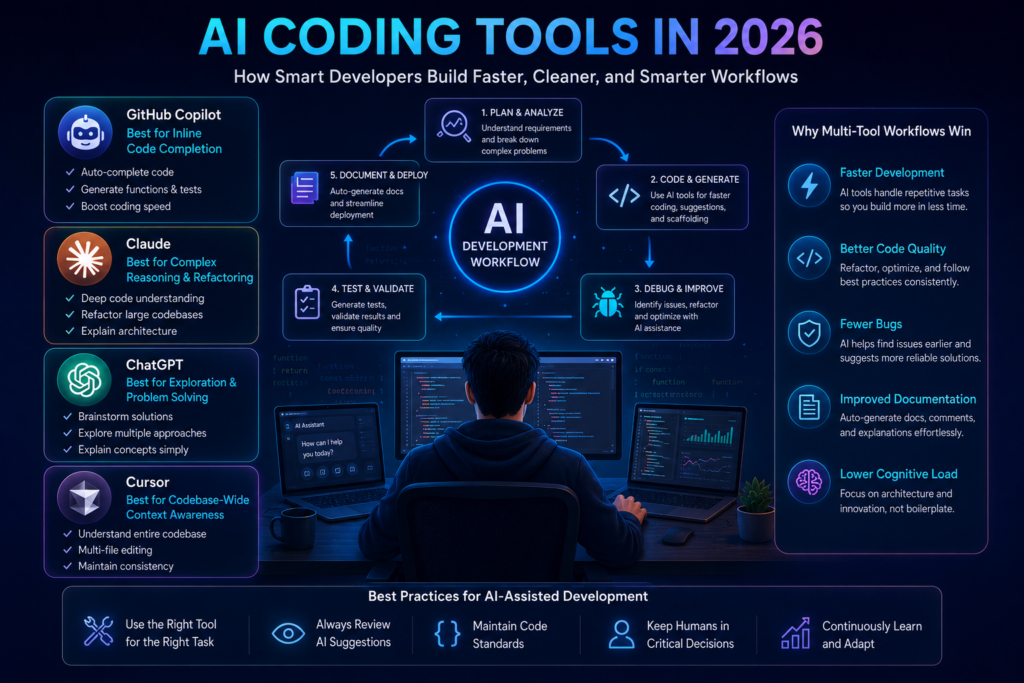
Faster Development Cycles
Developers can scaffold APIs, models, and repetitive logic almost instantly.
Better Code Quality
AI tools help refactor messy implementations into cleaner, more maintainable structures.
Reduced Bugs
Context-aware assistants can identify edge cases and logical inconsistencies earlier in development.
Improved Documentation
Developers can automatically generate docstrings, comments, API documentation, and onboarding notes.
Lower Cognitive Load
AI handles repetitive implementation tasks so developers can focus on solving complex engineering problems.
Wider Problem-Solving Coverage
Different AI tools generate different approaches to the same problem, improving solution quality.
At Pure Technology, we encourage organizations to treat AI coding tools as workflow amplifiers, not replacements for engineering expertise.
The 4 Best AI Coding Tools in 2026
Not every AI coding tool solves the same problem. The key is understanding each tool’s core strength.
1. GitHub Copilot – Best for Inline Code Completion
GitHub Copilot remains one of the most widely adopted AI coding tools in 2026.
Best Use Cases
- Writing boilerplate code
- Completing repetitive functions
- Generating CRUD operations
- Auto-generating unit tests
- Speeding up API scaffolding
Why Developers Use It
Copilot integrates directly inside editors like VS Code and JetBrains, making AI suggestions feel seamless during development.
Limitation
It excels at local code generation but struggles with deep architectural reasoning or large multi-file understanding.
2. Claude – Best for Complex Reasoning and Refactoring
Claude has become a preferred AI assistant for large-scale reasoning tasks.
Best Use Cases
- Debugging multi-file systems
- Refactoring legacy applications
- Explaining architectural trade-offs
- Writing technical documentation
- Understanding large codebases
Why Developers Use It
Claude handles extended context exceptionally well, making it ideal for large engineering discussions.
Limitation
It works best as a conversational assistant rather than an inline development tool.
3. ChatGPT – Best for Exploration and Iterative Problem Solving
ChatGPT is widely used for brainstorming and exploring multiple implementation approaches.
Best Use Cases
- Exploring algorithm alternatives
- Understanding unfamiliar frameworks
- Debugging regex or parsing logic
- Generating edge-case test scenarios
- Translating technical concepts into plain English
Why Developers Use It
It helps developers quickly compare multiple ideas without spending hours researching manually.
Limitation
Responses require validation because generated solutions may prioritize plausibility over accuracy.
4. Cursor – Best for Codebase-Wide Context Awareness
Cursor AI has gained popularity because it understands entire codebases rather than isolated files.
Best Use Cases
- Cross-file refactoring
- Codebase-wide modifications
- Onboarding into legacy systems
- Maintaining architectural consistency
- Multi-file code generation
Why Developers Use It
Cursor helps developers work efficiently inside large-scale projects without constantly switching context.
Limitation
Teams must carefully configure style rules and architectural constraints to avoid inconsistent output.
How to Build an Effective AI Coding Workflow
Installing multiple AI tools without structure creates confusion. High-performing teams follow a defined workflow.
Step 1: Identify Workflow Bottlenecks
Before adopting tools, identify where your development process slows down.
Ask questions like:
- Which repetitive tasks consume the most time?
- Is debugging slowing development velocity?
- Is documentation inconsistent?
- Are developers struggling with large legacy systems?
- Are compliance or security constraints important?
Map tasks into categories:
- Code generation
- Debugging
- Documentation
- Refactoring
- Testing
Then choose tools that complement each category.
Step 2: Select Complementary Tools
Avoid overlapping tools. A strong workflow often looks like this:
GitHub Copilot for inline coding and faster code completion.
- Claude for architecture reasoning and complex problem-solving.
- ChatGPT for brainstorming ideas and iterative development.
- Cursor for large codebase editing and context-aware development.
This minimizes cognitive overload while maximizing productivity.
Step 3: Introduce Tools Gradually
Do not introduce multiple AI systems simultaneously.
Week 1–2
- Use GitHub Copilot only
- Focus on repetitive coding tasks
- Review every suggestion manually
Week 3–4
- Introduce Claude or ChatGPT
- Use them for debugging and reasoning
- Compare solution quality between tools
Week 5+
- Add Cursor AI for large-scale refactoring
- Establish AI usage guidelines
- Track productivity improvements honestly
Gradual adoption improves developer oversight and reduces dependency risks.
Defining AI Zones vs Human Zones
One of the biggest mistakes companies make is allowing AI to operate everywhere without boundaries.
At Pure Technology, we recommend separating AI-assisted tasks from human-led responsibilities.
AI Zones
AI tools work well for:
- Boilerplate generation
- CRUD operations
- Unit test scaffolding
- Documentation writing
- Formatting and linting fixes
- Data transformation scripts
Human Zones
Human oversight should remain dominant for:
- System architecture
- Security-sensitive code
- Authentication systems
- Performance-critical algorithms
- Business-critical logic
- Sensitive data handling
This balance preserves code quality while still accelerating delivery.
Common Challenges with AI Coding Tools
Even advanced workflows encounter challenges.
Challenge 1: AI Suggestions Ignore Architecture
Solution
Provide architectural context explicitly through:
- Style guides
- Project documentation
- System prompts
- Shared engineering standards
Challenge 2: Over-Reliance Weakens Core Skills
Solution
Treat AI output like junior developer code:
- Review everything critically
- Validate edge cases
- Run comprehensive tests
- Reserve regular AI-free coding time
Challenge 3: Inconsistent Code Quality
Solution
Use:
- Shared coding standards
- Centralized linting rules
- Unified prompts across tools
- Strict review processes
Challenge 4: Context Window Limitations
Solution
Break large tasks into smaller scoped problems and use codebase-aware tools like Cursor AI for complex refactors.
How AI Coding Tools Are Changing Developer Skills
AI is not replacing developers. It is changing how developers work.
Beginners
New developers risk becoming over-dependent if they skip learning fundamentals.
Intermediate Developers
This group benefits the most because AI accelerates tasks while still allowing critical evaluation.
Senior Developers
Senior engineers use AI as a force multiplier for speed, documentation, and workflow efficiency while maintaining architectural ownership.
The most successful developers in 2026 are not the ones using AI blindly. They are the ones using AI strategically.
Best Practices for Using AI Coding Tools Effectively
Here are the most important principles modern engineering teams follow:
- Match tools to specific workflow stages
- Avoid unnecessary tool overlap
- Configure AI tools with project standards
- Validate every AI-generated suggestion
- Keep humans responsible for architecture and security
- Measure success using shipped features, not generated code volume
- Maintain AI-free coding sessions to preserve core engineering skills
Final Thoughts
AI coding tools are rapidly transforming software development in 2026. But productivity gains don’t come from installing more tools. They come from building smarter workflows.
The developers achieving the best outcomes are combining AI assistants intentionally:
- GitHub Copilot for speed
- Claude for reasoning
- ChatGPT for exploration
- Cursor AI for codebase-wide awareness
At Pure Technology, we help businesses and engineering teams implement AI-powered development workflows that improve productivity without sacrificing quality, scalability, or security.
The future of software development is not AI replacing developers. It’s developers using AI strategically to build faster, smarter, and better systems.